LMI (DJL Serving) 내부 구조
TL;DR
DJL Serving의 Java 프론트엔드가 요청을 라우팅하고, 모델별 Python 워커 프로세스가 추론을 실행합니다. 여러 워커가 같은 GPU 메모리를 공유하므로 GPU 한 장에서 여러 모델을 운영할 수 있습니다.
LMI 컨테이너 구성
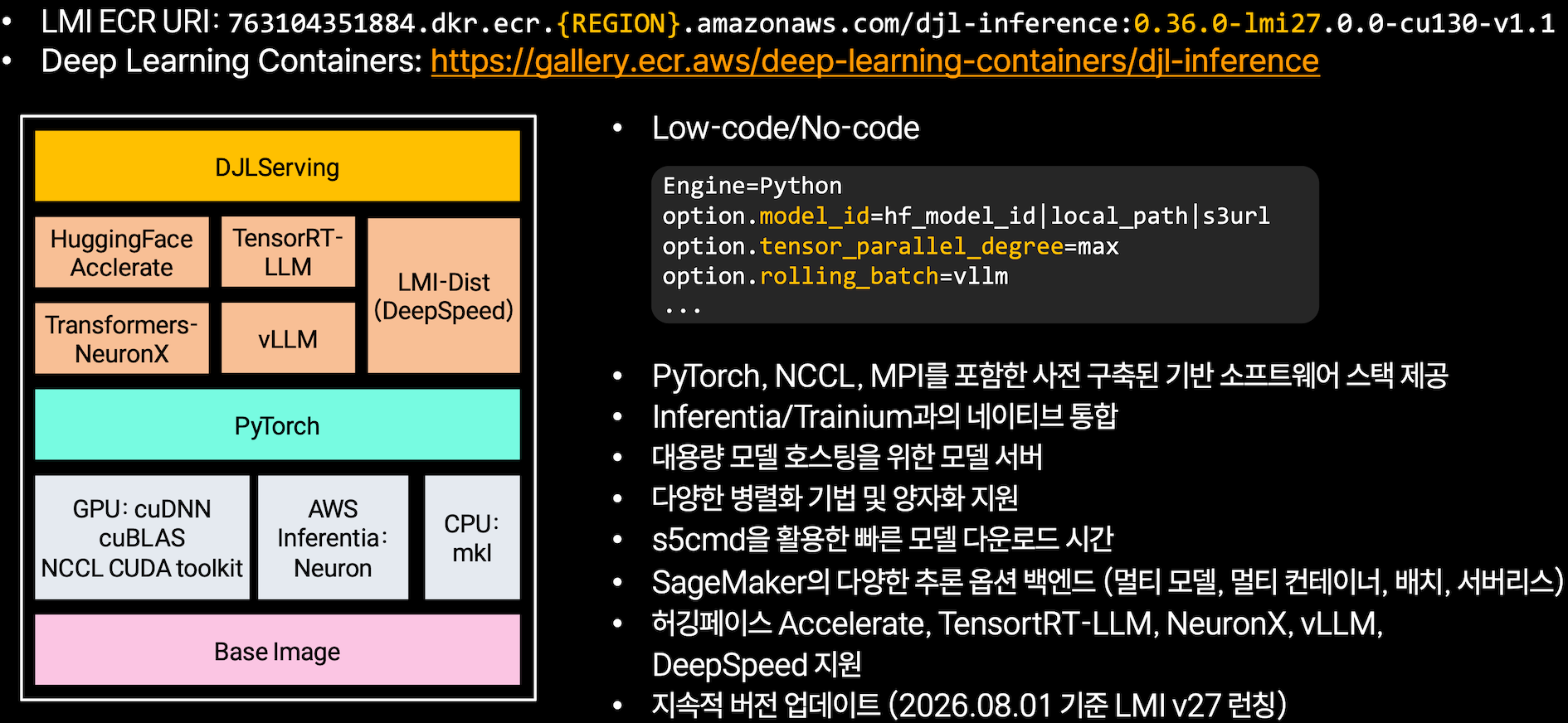
SageMaker LMI DLC는 DJL Serving을 프론트엔드로 사용하고 여러 추론 백엔드와 가속 라이브러리를 함께 제공합니다. 그림의 계층을 아래에서 위로 정리하면 다음과 같습니다.
| 계층 | 내용 |
|---|---|
| Base Image | OS와 기본 런타임 |
| 가속 라이브러리 | GPU(cuDNN, cuBLAS, NCCL), Inferentia(Neuron), CPU(mkl) |
| PyTorch | 공통 프레임워크 |
| 백엔드 | HuggingFace Accelerate, TensorRT-LLM, LMI-Dist(DeepSpeed), Transformers-NeuronX, vLLM |
| DJL Serving | HTTP 요청을 받아 대상 모델을 선택하는 Java 프론트엔드 |
LMI DLC에는 여러 백엔드가 포함되어 있으므로 모델 아키텍처에 따라 실행 경로를 선택할 수 있습니다. vLLM이 지원하지 않는 DeBERTa 계열은 Hugging Face Accelerate 경로로 로드되므로 LMI에서 서빙할 수 있습니다.
백엔드 선택에는 serving.properties의 option.rolling_batch 설정이 사용됩니다. 이 저장소의 인코더 모델에서는 LMI가 rolling_batch=disable을 선택했으며, 실제 추론은 vLLM이나 TensorRT-LLM이 아닌 Accelerate 경로에서 실행되었습니다.
사용 가능한 백엔드는 이미지 태그에 따라 다릅니다
그림에 표시된 백엔드가 모두 하나의 이미지에 포함되는 것은 아닙니다. vLLM 계열 태그 (djl-inference:0.36.0-lmi26.0.0-cu130)에는 tensorrt_llm이 없습니다. trtllm을 사용하려면 해당 백엔드가 포함된 이미지로 변경해야 합니다. 이 차이는 ModuleNotFoundError로 확인했습니다.
프로세스 구조
로컬 컨테이너에 모델 세 개를 등록한 후 확인한 프로세스 목록입니다.
PID  PPID   RSS      CMD
1    0      3.5MB    dockerd-entrypoint.sh serve
55   1      213MB    java ai.djl.serving.ModelServer          ← Java 라우터 1개
176  55     1279MB   python djl_python_engine.py --model-dir .../minilm    --device-id 0
225  55     1231MB   python djl_python_engine.py --model-dir .../xlmrlarge --device-id 0
274  55     1204MB   python djl_python_engine.py --model-dir .../mdeberta  --device-id 0
Java 프로세스는 HTTP 요청을 받고 대상 모델을 결정하는 프론트엔드입니다. 모델을 직접 로드하지 않았으며, 측정한 RSS는 213MB였습니다.
Python 엔진에서는 워커마다 별도 Python 프로세스가 생성됩니다. DJL Serving Architecture는 이를 다음과 같이 설명합니다.
"Each worker thread (in each worker group in each worker pool) has it's own process."
이 구성에서 Java 프로세스와 Python 워커는 Unix domain socket으로 통신했습니다.
GPU 공유 방식
세 워커 프로세스는 모두 --device-id 0으로 실행됩니다. 각 프로세스가 별도의 CUDA 컨텍스트를 생성하고 같은 GPU 메모리를 사용합니다.
nvidia-smi --query-compute-apps=pid,used_memory
  1619773    852 MiB
  1619888   2578 MiB
  1619978    976 MiB     ← 합계 약 4.4GB / 46GB
Inference component와 LMI의 차이는 GPU 자원을 할당하는 위치와 단위에 있습니다.
| inference component | LMI | |
|---|---|---|
| GPU 할당 주체 | SageMaker 컨트롤 플레인 | 컨테이너 안의 프로세스들 |
| 할당 단위 | GPU 한 장 이상 | GPU 메모리 |
| SageMaker가 관리하는 단위 | 컴포넌트 N개 | 컨테이너 1개 |
| 모델 3개에 필요한 GPU | 3장 | 1장 |
SageMaker는 LMI를 컨테이너 하나로 관리합니다. 컨테이너 내부의 모델별 프로세스에는 inference component의 GPU 한 장 최소 할당 제약이 적용되지 않습니다.
연산 자원은 프로세스 간에 경쟁합니다
프로세스는 GPU 메모리뿐 아니라 streaming multiprocessor(SM) 같은 연산 자원도 공유합니다. 동시 요청이 많으면 각 프로세스의 CUDA 커널이 같은 GPU 자원을 두고 경쟁합니다. 이 현상은 concurrency 8에서 LMI가 39 req/s, GPU 네 장을 사용한 inference component가 61 req/s였던 결과의 원인일 수 있습니다. 다만 프로파일링으로 확인한 결과는 아닙니다.
모델별 워커와 큐
DJL Serving Management API에서 확인할 수 있듯이, Java 서버는 모델마다 별도의 워커 그룹과 요청 큐를 관리합니다.
GET /models/mdeberta
{
  "modelName": "mdeberta",
  "batchSize": 1,
  "maxBatchDelayMillis": 100,
  "maxIdleSeconds": 60,
  "queueSize": 1000,
  "requestInQueue": 0,
  "workerGroups": [{
    "device": {"deviceType": "gpu", "deviceId": 0},
    "minWorkers": 1,
    "maxWorkers": 1,
    "workers": [...]
  }]
}
- 워커 그룹은 디바이스별로 구분됩니다. 같은 모델을 CPU 그룹과 GPU 그룹에 동시에 둘 수도 있습니다.
"The groups correspond to the support for the model on a particular device."
- 모델별 요청 큐(
queueSize: 1000)가 있으므로 한 모델의 큐 적체가 다른 모델에 미치는 영향을 줄일 수 있습니다. maxBatchDelayMillis: 100: 서버가 최대 100ms 동안 요청을 모아 동적 배치를 구성합니다.maxIdleSeconds: 60: 유휴 워커를 정리합니다.
serving.properties 설정
engine=Python
option.model_id=MoritzLaurer/mDeBERTa-v3-base-xnli-multilingual-nli-2mil7
option.task=text-classification
option.rolling_batch=disable
gpu.minWorkers=1
gpu.maxWorkers=1
required_memory_mb=2048
| 설정 | 의미 |
|---|---|
gpu.minWorkers / gpu.maxWorkers |
GPU 워커 수 (기본 최댓값 2) |
cpu.minWorkers / cpu.maxWorkers |
CPU 워커 수 |
required_memory_mb |
로드에 필요한 메모리 |
gpu.required_memory_mb |
GPU 메모리만 따로 |
reserved_memory_mb |
OOM 방지용 예약 |
설정별 의미와 기본값은 DJL Model Configuration에서 확인할 수 있습니다.
워커 수에 따라 GPU 메모리 사용량도 증가합니다
워커마다 Python 프로세스가 생성되고 각 프로세스가 모델을 로드합니다. 워커 수를 늘릴 때는 GPU 메모리 사용량을 함께 확인해야 합니다.
백엔드 선택
LMI는 rolling_batch 값에 따라 생성 모델의 배치 처리 방식을 선택합니다.
class RollingBatchEnum(str, Enum):
    vllm = "vllm"
    auto = "auto"
    disable = "disable"
    trtllm = "trtllm"
| 백엔드 | 용도 | SageMaker DLC 태그 |
|---|---|---|
vllm |
생성 LLM (continuous batching) | djl-inference:0.36.0-lmi26.0.0-cu130 |
trtllm |
생성 LLM (NVIDIA 최적화) | djl-inference:0.29.0-tensorrtllm0.11.0-cu124 |
auto |
LMI가 모델 구성을 바탕으로 자동 선택 | - |
disable |
rolling batch를 사용하지 않고 transformers 사용 | - |
같은 djl-inference 저장소를 사용하더라도 이미지 태그에 따라 포함된 백엔드가 다릅니다. vLLM 이미지에는 tensorrt_llm이 없으므로 trtllm을 사용하려면 해당 백엔드가 포함된 이미지를 선택해야 합니다.
인코더 모델의 실행 경로
LmiConfigRecommender: The model task architecture [DebertaV2ForSequenceClassification]
is not supported for optimized inference. LMI will attempt to load the model using
HuggingFace Accelerate. Optimized inference performance is only available for the
following task architectures: [ForConditionalGeneration, LMHeadModel, ForCausalLM]

Detected mpi_mode: null, rolling_batch: disable, tensor_parallel_degree: 1,
for modelType: deberta-v2
이 저장소의 인코더 모델에서는 rolling_batch=disable이 선택되었습니다. 프로세스에 로드된 라이브러리와 조건부 import 경로를 확인한 결과, 실제 추론은 transformers와 PyTorch가 수행했습니다.
# djl_python/huggingface.py
def get_rolling_batch_class_from_str(rolling_batch_type: str):
    if rolling_batch_type == "vllm":
        from djl_python.rolling_batch.vllm_rolling_batch import VLLMRollingBatch
vLLM DLC는 지원하지 않는 아키텍처를 로드하지 못하지만, LMI는 Accelerate 경로를 사용할 수 있습니다. 이 차이로 인해 DeBERTa를 LMI에서 서빙할 수 있습니다.
이 인코더 워크로드에서 LMI를 사용하는 주된 이유는 특정 최적화 백엔드가 아니라 DJL Serving의 멀티모델 관리 기능입니다. 추론은 HF DLC와 마찬가지로 transformers와 PyTorch 경로에서 실행됩니다.
CPU 이미지는 다릅니다
djl-inference:0.35.0-cpu-full 은 Java 엔진 위주라 Python 패키지가 없습니다.
모델 아티팩트에 requirements.txt를 포함해야 합니다: transformers, torch, sentencepiece, protobuf, peft, accelerate.
LMI GPU 이미지에는 해당 패키지가 포함되어 있으므로 별도로 추가하지 않았습니다.
이미지 라벨
| 이미지 | accept-bind-to-port | multi-models |
|---|---|---|
djl-inference:0.35.0-cpu-full |
✅ | ✅ |
djl-inference:0.36.0-lmi26.0.0-cu130 |
✅ | ✅ |
huggingface-pytorch-inference (cpu/gpu) |
✅ | ✅ |
vllm:0.26.0-...-sagemaker |
❌ | ❌ |
multi-models=true인 LMI 이미지는 SageMaker multi-model endpoint에 사용할 수 있습니다. 모델 아티팩트를 S3에 추가한 후, 요청의 TargetModel로 대상 모델을 지정합니다.
로컬에서 직접 확인하기
bash 04_gpu_cohost_lmi/scripts/serve_local_lmi.sh

# 프로세스 구조
docker exec encoder-lmi-local ps -eo pid,ppid,rss,cmd

# GPU 메모리를 누가 쓰나
nvidia-smi --query-compute-apps=pid,used_memory --format=csv

# 등록된 모델과 워커 상태
curl -s http://localhost:8084/models | python3 -m json.tool
curl -s http://localhost:8084/models/mdeberta | python3 -m json.tool

docker rm -f encoder-lmi-local